Lock selected iPhone apps without an account | Lockstead
Lockstead is an app lock for iPhone and iPad. Its free tier protects one selected app; VIP adds multi-app management and advanced rules.
Start with one app. Verify the result.
Try protection for one app free. The existing screenshot shows setup controls, not a completed restriction or a simulated result.
- Authorize and choose
Allow Screen Time access on your own iPhone or iPad. Tap Choose Apps and start with one supported app.
- Enable protection
Review your selection and turn on Enable Lock. A 0 selected or switched-off screen is not an active restriction.
- Test outside Lockstead
Leave Lockstead and try opening the restricted app, then an allowed app. If either behaves unexpectedly, do not rely on the setup when lending the phone.
- Practice changing it back
Return to Lockstead, adjust or turn off the restriction, and confirm you know how to restore access. Review notification previews and content inside allowed apps separately.
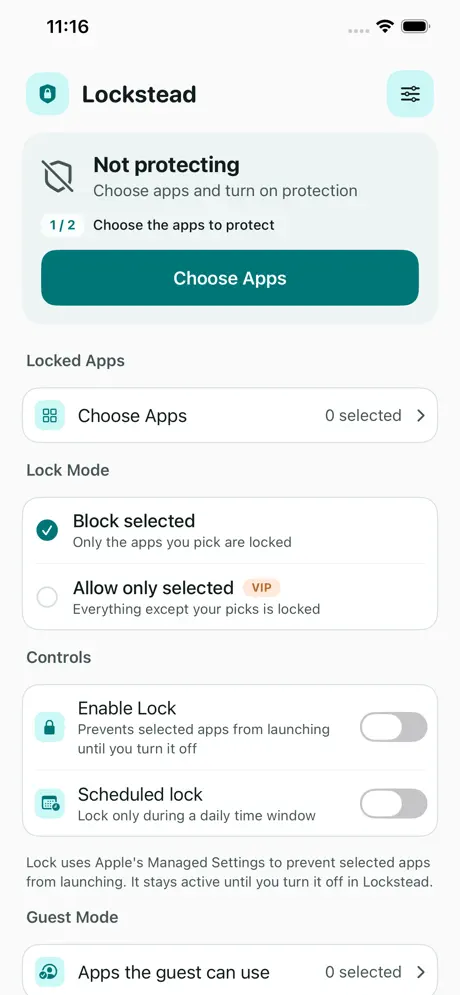
Guest Mode and multi-app management require VIP. No physical-device enforcement recording is presented here. Guest Mode is not a separate iOS user and does not isolate content inside allowed apps.
Set up and check protection
- Install Lockstead and authorize Screen Time when requested.
- Set a six-digit PIN and choose optional Face ID or Touch ID.
- Select an app to protect and enable your restriction.
- Leave Lockstead and try opening the protected app. Verify the restriction before lending the phone.
- Return to Lockstead to adjust your configuration. Check the current purchase options if you need more protected apps.
When is Guest Mode useful?
Guest Mode leaves only your chosen apps available when another person uses your device. It is listed among VIP features. Verify the allowed apps and restrictions before handing over your phone.
What does it protect?
Uses Apple Screen Time restrictions. It does not encrypt files inside other apps or redact shared content. Verify restrictions on your device before handing it over.
Read features, privacy and purchase information
Download Lockstead on the App Store
Developer-maintained information. Current compatibility, features and regional prices follow the App Store listing.
Which privacy app fits your task?
| Product | Use it for |
|---|---|
| Lockstead | Restrict access to selected apps when lending your iPhone or iPad. |
| SealedPocket (formerly ZeroNet Space) | Store photos, videos, documents, notes and audio in a local encrypted vault. |
| Cloakmark (formerly zeroNet Redact) | Hide private details in photos, screenshots, videos and PDFs before sharing. |
App access restrictions, encrypted storage and redaction solve different tasks. Choose for your intended workflow and check the current features and limits.
Why choose Lockstead?
For repeatable borrowing rules across selected apps, consider Lockstead and optional paid VIP Guest Mode. For one app, Apple’s Guided Access may be enough; for authentication before opening supported apps, consider Apple’s built-in app lock.
If protection does not behave as expected
Keep Screen Time authorization enabled, review the selected apps and current rules, then test again. If an allowed or restricted app behaves unexpectedly, do not rely on the setup when lending your device. Use the App Store listing to find the developer’s support details.
Know the limits
Guest Mode has not been verified here on a physical device. It does not create an isolated iOS guest account or separate app data; no isolation or bypass-proof guarantee is made.
Start with one app
VIP offers lifetime, monthly and annual options. Monthly and annual plans are subscriptions, not lifetime purchases. Availability, renewal terms and prices follow the current local App Store.
Repeating the same app boundary
Can I schedule app restrictions for the same time every day?
Lockstead offers daily protection windows using Screen Time. Configure the supported apps and the protection window, then test a restricted app both inside and outside that window. iOS can delay background changes, so check the actual protection state before lending your device rather than relying only on the schedule. Guest Mode and multi-app management require VIP; check current purchase options for the features you need.